
This document covers settings for your WordPress website. Remember to click Save Changes after you make any alterations.
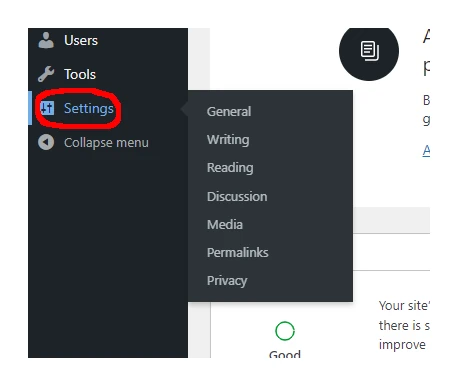
General
This is where you can alter settings such as the time zone, date format, administrator email address etc.
Writing
The only thing you might need to change here is the Default Post Category. This is the setting that puts your blog posts into whatever category you define by default.
Reading
This section is related to the display of your blog posts. You probably shouldn’t change anything here as it may break the layout of your website.
Discussion
Here you can choose more settings for your blog posts. Don’t forget to click Save Changes at the bottom if you make any changes.
Media
These are the settings for your image files. Changing anything here could potentially break the layout of your website.
Permalinks
This is set to Post name by default. We can ignore this section.
Privacy
This is where you can create a new policy page or choose a current one.